Zero inline scripts, and the six things that broke on the way
This site runs under a Content Security Policy that only allows scripts from its own files. Getting there took six fixes, most of them in places I did not expect: the build tool, a syntax highlighter, a page-turn library and a diagram renderer.
A Content Security Policy tells the browser which scripts, styles and images a page may use. The strongest useful rule for scripts is short: script-src 'self'. Only script files served from this site may run. No inline <script> blocks, no eval, nothing injected.
The benefit is simple. If someone ever manages to get text into a page, through a comment, a bad dependency or a mistake of mine, the browser still refuses to run it as code.
I set that rule early on this site, which is static and built with Astro. The site worked in development and broke in production six times. Each break taught me where inline code hides.
The six breaks
| What broke | Why | Fix |
|---|---|---|
| Light and dark theme flashed on load | The theme script has to run before first paint, and the bundler wanted to move it | Serve it as a tiny file of its own, loaded as is in the page head |
| Small scripts stopped running | The build tool inlines files under a size threshold to save a request | Set the inline threshold to zero |
| Every page loaded the book reader | A dynamic import pulled the page-turn code into the shared bundle | Load the reader only from chapter pages |
| Code samples lost their colours | The syntax highlighter writes colours as style attributes |
Allow inline style attributes only; style elements stay locked |
| The page-turn effect lost its styling | The library injects two <style> elements at runtime |
Allow exactly those two by their SHA-256 hashes |
| Diagrams failed to render as images | The diagram renderer emitted HTML labels that are not valid inside an image | Render labels as plain SVG text |
The pattern across all six: nothing in my own code was inline. The inline code came from tools making helpful choices on my behalf.
What the policy allows now
- Scripts: this site’s files, plus Cloudflare’s privacy-friendly analytics script.
- Styles: this site’s files, the two hashed library styles, and inline style attributes.
- Images: this site, plus
data:andblob:URLs for figures generated in the page. - Everything else: the site only. No plugins, no framing by other sites, forms post only to this site and the newsletter provider.
Allowing inline style attributes is the one concession. It is a much smaller risk than inline scripts: a style attribute can change how something looks but cannot run code. The alternative was dropping syntax highlighting, which would make the book worse for readers.
How I check it
Before a release I scan every built HTML page.
| Check | Result |
|---|---|
| Pages scanned | 63 |
| Executable inline scripts | 0 |
Inline <style> elements |
0 |
| Structured data blocks (JSON, not executable) | Allowed |
Structured data for search engines uses <script type="application/ld+json">. Browsers do not execute it, so the policy does not block it and the check allows it.
I also open every page type in a real browser with the production headers and fail the test on any policy violation in the console. That is how the page-turn styles were caught. No static scan would have seen styles injected at runtime.
The weight that came with it
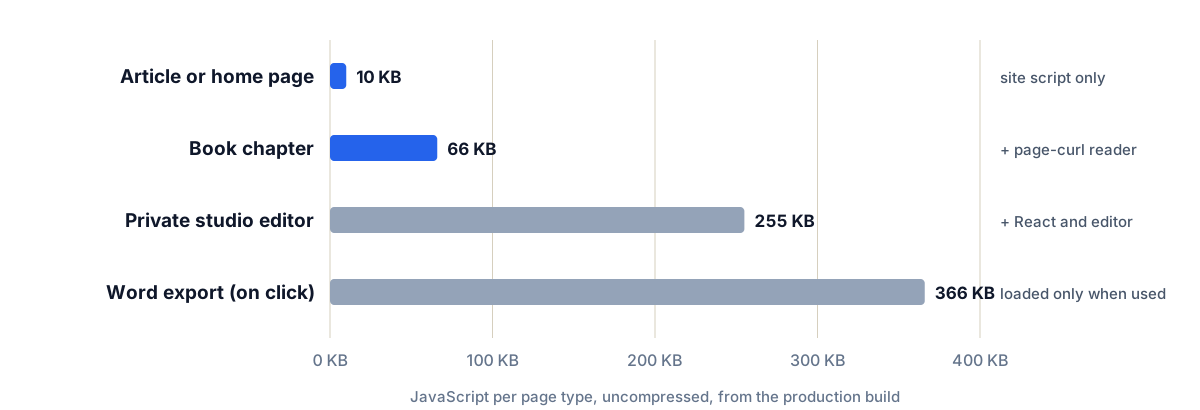
Figure 1. JavaScript per page type, uncompressed. The private editor is heavy because it uses React; the Word export only loads when someone clicks it.
Moving every script into files had a side effect I liked. Each page type now loads only what it uses. An article loads 10 KB. A book chapter loads 66 KB. The private editor loads React, and its 366 KB document export is fetched only on the click that needs it.
If you are doing this yourself
- Set the strict policy on day one. Retrofitting it is how you find six problems at once.
- Test with production headers. Development servers usually do not send them, so everything looks fine until it ships.
- Read what your build tool inlines. Size thresholds and helpful optimisations are where inline code comes from.
- Hash, do not allow broadly. When a library needs an exception, allow its exact content, not a whole category.