6.1 The 150% PLE concept and where it came from
150% Product Line Engineering is a phrase whose exact meaning has blurred over the two decades since it caught on. The core idea hasn't changed, though. A 150% model is one specification that holds every feature any variant of the product line could have, knowing that no single shipped variant will use all of them. Each shipped variant is its own 100%, computed from the 150% model by picking a subset of features that satisfies the model's constraints.
That 50% gap is the configuration space your product line spans. The idea is simple. Doing it well is not. Here I'll cover where the discipline came from and the problems it solves, as groundwork for the constructs in Subchapters 6.2 to 6.5.
Historical roots
150% PLE emerged in the 1990s from two traditions that grew toward each other. The first was software product line engineering, formalized by Clements and Northrop in Software Product Lines: Practices and Patterns (2001) at the Carnegie Mellon Software Engineering Institute. Their framework introduced the now-standard split between core assets (artifacts shared across the line) and variation points (artifacts that differ between products). Each variation point gets an explicit binding time: compile-time, link-time, configuration-time or runtime.
The second was feature-oriented domain analysis (FODA), introduced by Kang et al. in Feature-Oriented Domain Analysis (FODA) Feasibility Study (CMU/SEI-90-TR-021, 1990). FODA gave us the feature diagram: a tree of features with variability annotations on each non-leaf node. It is the recognizable ancestor of every commercial PLE tool's feature notation, Sylang's .fml included. Kang and colleagues used four annotations (mandatory, optional, alternative, or), and Sylang uses the same four today with essentially unchanged semantics.
In the early 2000s the two traditions converged through the European FAMILIES and VARMOD research projects. They also met in the practitioner work of pure::systems (founded 2003), whose pure::variants remains a dominant commercial PLE tool. The phrase 150% model itself appears to come from German automotive suppliers in the mid-2000s, as Bosch and Continental adopted variant-aware engineering for engine control units. Beuche et al. popularized it in English-language MBSE literature with Variability Management with Feature Models (2004).
The structural problem PLE solves
You can state the problem precisely. If you develop a product line (several related products that share a lot of engineering content), you face three combinatorial challenges, and each one grows faster than the line does. If you've ever kept three copies of the same safety requirement in sync by hand, you've already met the first.
- Artifact duplication. Without PLE discipline, each variant tends to become its own engineering project with its own copy of the artifacts. A change to a shared requirement (say, a safety requirement common to all variants) has to be copied by hand into every variant. Maintenance cost grows with the number of variants, and so does the risk of inconsistency.
- Configuration combinatorics. A product line with N independent binary features admits 2^N combinations. Add inter-feature constraints (this feature requires that one, this one excludes that one) and only a subset of 2^N is valid. Finding that subset is a constraint-satisfaction problem, NP-hard in general. Without explicit machinery, teams fall back on listing only the configurations they ship today, with no systematic way to evaluate new ones.
- Variant-specific evidence. Safety-critical artifacts (requirements, tests, FMEAs, safety cases) must be valid for the variant they apply to. A requirement that makes sense for the 10 kg cobot may not make sense for the 3 kg one. A test written for the cleanroom-certified variant may be irrelevant to the standard one. Without PLE discipline, that knowledge lives in informal notes ("applies to 5 kg and 10 kg only") that no machine can check.
All three challenges are structural: they come from the combinatorial nature of multi-variant engineering. Any serious PLE system answers each one with an architectural commitment, and Sylang does too.
One shared engineering model with explicit variability annotations takes care of duplication. A constraint vocabulary on the feature model (mandatory, optional, or, alternative, plus requires and excludes), solved automatically by the @sylang/variant-matrix package, takes care of combinatorics. The when ref config mechanism takes care of variant-specific evidence by gating any artifact in the project against the resolved variant configuration. One model, many products, and a machine that knows which is which.
Why the cobot anchors this chapter
I chose the industrial cobot as this chapter's anchor because its feature space exercises all four of Sylang's variability annotations in their textbook use. The cobot product line varies along five axes:
- Payload class. One of 3 kg, 5 kg or 10 kg. Exactly one must be selected. This is the textbook alternative relationship.
- Safety functions. Safe stop, safe-monitored speed, safe direction and collision detection. ISO 10218-1 requires all of them in every variant, which makes this the textbook mandatory relationship.
- Sensing package. A force-torque sensor and integrated vision, each optional on its own. This is the textbook optional relationship: each feature stands alone, with no implicit or or alternative between them.
- Cleanroom certification. A single optional feature. Selecting it triggers a substantial cascade of downstream requirements (sealed joints, IPA-compatible surfaces, no particulate shedding). It shows the variant-gating cascade that when ref config makes possible.
- Inter-feature constraints. None in the cobot model as authored. That's deliberate: the cobot keeps its constraint structure simple. The EPB anchor, referenced in Subchapter 6.5, has a requires constraint (auto-vehicle-hold requires hill-hold) that exercises the constraint-solving machinery.
Together the five axes give 3 (payload) × 1 (mandatory safety) × 4 (sensing combinations: none, FT only, vision only, both) × 2 (cleanroom: no, yes) = 24 distinct variants. In the anchor scenario, the cobot platform team ships about a dozen of these as catalog SKUs and accepts the rest as custom orders. The variant matrix tool computes the whole configuration space from the .fml, so you can enumerate the shipping variants without tracking them by hand.
What's ahead in Chapter 6
The next four subchapters give you the language constructs that put this discipline into practice. Subchapter 6.2 covers the .fml file in detail: its syntax conventions, its property set and its feature-model relationships. Subchapter 6.3 covers the four variability flags and the sibling-consistency rule that limits how they combine. Subchapter 6.4 covers the .vml and .vcf file types and the pipeline that generates them.
Subchapter 6.5 covers when ref config, the cross-cutting mechanism the rest of your project uses to consume the variant configuration. Work through the chapter alongside the cobot files in companion-project/industrial-cobot/, and you'll be ready to author a complete PLE artifact set for your own product line.
This book follows the same order: PLE in Chapter 6, functions in 7, architecture in 8, requirements in 9, tests in 10 and integration in 11.
Exercises
6.2 The .fml file in depth
The .fml file is Sylang's feature model. By convention a product line has one .fml file (the language allows more, but the variant-matrix tooling assumes one), and it lists every feature the product line may have. In this subchapter we'll go deep enough for you to author production-quality feature models. I'll work from the cobot anchor's CobotFeatures.fml, with representative pieces of the EPB, autopilot and infusion pump feature models as mirror examples.
File structure and required keywords
An .fml file opens with one or more use productline statements (usually one, naming the parent product line). Next comes the header hdef featureset <Name> with its properties, and then the feature tree: a hierarchy of def feature clauses with variability flags. The cobot anchor's file shows the canonical structure:
use productline CobotProductLine

hdef featureset CobotFeatures
  name "Cobot Feature Set"
  description "Feature model spanning the three payload classes..."
  owner "Industrial Robotics Architecture"
  safetylevel SIL-3
  status approved
  listedfor ref productline CobotProductLine

  def feature CoreMotion mandatory
    name "Core six-axis motion"
    safetylevel SIL-3
    performs ref function MotionController

    def feature PayloadClass mandatory
      def feature Payload3kg alternative
      def feature Payload5kg alternative
      def feature Payload10kg alternative
  ...
The only required keywords on the hdef are hdef and featureset. Most files also carry name (display name), description (long form), owner (responsible organization) and status (the feature model's own lifecycle status). Add safetylevel for the highest safety level any feature in the model carries, which gives you a quick filter for safety-relevant models. Finish with listedfor ref productline (the bilateral link to the .ple) and, optionally, tags for queryability.
The feature tree sits below the hdef's properties, with top-level def feature clauses at column 2 and nested features deeper. The variability flag (mandatory, optional, or or alternative) goes right after the feature identifier, before any properties. That's a syntactic oddity worth knowing: in almost every other Sylang def clause, nothing follows the identifier on that line, and properties come on the lines below. In def feature, the flag takes that spot and is part of the def's identity (Subchapter 6.3 covers what each flag means).
Properties on def feature
Each def feature can carry a small set of properties at column 4, under the def at column 2. They fall into four groups: identity, classification, relationship and metadata.
- Identity: name (display name) and description (long-form prose on what the feature is and when a variant would include it).
- Classification: level says where in the system hierarchy the feature lives (typically system for top-level features, subsystem or component for nested ones). safetylevel is the feature's safety level, inherited by the artifacts that enable it. status is the feature's own lifecycle status, and tags rounds out the group.
- Relationship: performs ref function names the functions that realize the feature; it is the primary forward-traceability edge. requires ref feature and excludes ref feature say this feature depends on, or cannot coexist with, another one; both feed constraint solving. Less common are meets ref characteristic and meets ref safetygoal, which link the feature to AIAG-VDA characteristics or to safety goals. Rare at feature level are needs ref operation|signal and provides ref operation|signal, which are more at home on functions and blocks.
- Metadata: attach (file path or URL to supporting documentation) and owner (a per-feature owner, where it differs from the featureset owner).
In practice, performs ref function matters most. It is the primary forward link from the feature model to the function model, and the validator uses it to compute coverage. A feature without a performs edge may be orphaned (no function realizes it); a function without an inverse enables edge may be orphaned the other way. The coverage analysis in Chapter 15 surfaces both kinds of orphan.
Nesting and the feature tree
Features nest. A def feature can hold zero or more def feature children one indentation level deeper. The nesting reads as ordinary feature decomposition: a parent is realized by its mandatory children plus a selection of its optional, or and alternative children. Subchapter 6.3 makes those rules precise.
The language puts no limit on depth. As a rough guide, though, four or five levels is plenty, and a deeper tree often means the feature model is being used as a general-purpose taxonomy. That's not its job: the feature tree should say what the customer can choose between or among, not every taxonomic distinction within the product. Distinctions that aren't customer-facing belong in the function or block decomposition (Chapters 7 and 8).
The listedfor relationship and project hygiene
Every .fml file should carry listedfor ref productline <Name> on its hdef, naming the .ple the feature set belongs to. It is the only edge connecting the .fml to the rest of the project. Leave it out and the feature set is structurally orphaned from the product line root, so downstream coverage analysis flags every feature in the file as an isolation candidate.
Sylang Studio's template for a new .fml adds the listedfor for you, and files that AI agents author through the FeaturePlatformLead agent (or its equivalent) include it by default. Files imported from other formats, or hand-written from blank templates, sometimes miss it. In any serious project, a CI rule should fail the build when an .fml lacks the listedfor edge.
Mirror examples from the other three anchors
The cobot feature model covers the full surface of .fml syntax. Short mirror examples from the other three anchors show how the same patterns express quite different product spaces.
// EPB: form-factor alternative + premium-feature optionals
def feature CaliperActuation mandatory
  def feature SingleMotorCaliper alternative
  def feature DualMotorCaliper alternative

def feature HoldFeatures optional
  def feature HillHold optional
def feature AutoVehicleHold optional// Insulin pump: form-factor alternative + integration optionals
def feature FormFactor mandatory
def feature WearablePump alternative
def feature PoleMountedPump alternative
def feature DataIntegration optional
def feature CgmIntegration optional
def feature PredictiveLgs optional
requires ref feature CgmIntegration// Autopilot: trim-class alternative + advanced-mode optionals
def feature TrimClass mandatory
def feature StandardTrim alternative
def feature AdvancedAutoland alternative
def feature EnvelopeProtection mandatory
def feature AlphaProtection mandatory
def feature BankAngleLimiter mandatory
def feature GearOverspeed mandatoryThe three snippets share a pattern. A mandatory parent holds the variation point (form factor, trim class, sensing package), with alternative siblings for mutually exclusive choices and optional siblings for independent on/off decisions. The pattern is general enough to express the dominant variability structures across automotive, aerospace, medical and industrial product lines. When your model drifts away from it, that's usually a sign the feature model is doing work that belongs elsewhere.
What's next
Subchapter 6.3 covers the four variability flags and the sibling-consistency rule that limits how they combine. That rule is a frequent source of authoring errors in .fml files. Understand it precisely, and you understand the difference between a feature model that compiles and one that doesn't.
Exercises
6.3 Variability flags and the sibling-consistency rule
Sylang's feature-model semantics rest on four variability flags (mandatory, optional, or, alternative) and one rule about how they may combine: the sibling-consistency rule. In this subchapter I'll pin down what each flag means and show it at work in the anchor projects. Then we'll look at the rule and why it exists.
mandatory
A mandatory feature is present in every variant of the product line. Its parent must be present too. A mandatory child of an optional or alternative parent is mandatory only if the parent is selected; the sibling-consistency rule below covers this chained logic. Mandatory features are the spine of the product line: take one away and the product stops being a member of this line.
In the cobot anchor, CoreMotion and SafetyFunctions are mandatory. Every cobot in the line has six-axis coordinated motion and the ISO 10218-1 safety functions. Remove either one and you may still have valid engineering, but you no longer have a cobot this product line would sell.
def feature CoreMotion mandatory
  name "Core six-axis motion"
  safetylevel SIL-3

def feature SafetyFunctions mandatory
  name "Safety functions (ISO 10218-1 mandatory)"
  safetylevel SIL-3

  def feature SafeStop mandatory
    name "Category 0 / 1 / 2 safe stop"
    safetylevel SIL-3
optional
An optional feature may or may not be present in a given variant. That choice is independent of every other feature, except where explicit requires or excludes relationships say otherwise. Optional features are the usual home for variability customers choose freely: cleanroom certification, integrated vision, force-torque sensing. Each is selectable on its own, with no implicit link to the others.
In the cobot anchor, ForceTorqueSensor and IntegratedVision are optional siblings under SensingPackage. A variant may include neither, either one or both: four combinations. In the EPB anchor, HillHold and AutoVehicleHold are optional siblings under HoldFeatures, with a twist. AutoVehicleHold carries requires ref feature HillHold (AVH needs hill-hold as a prerequisite), so the four combinations collapse to three valid configurations.
alternative
alternative siblings form a mutually exclusive set: every variant selects exactly one of them. Use it for choices like payload class (3 kg, 5 kg or 10 kg), engine type (gasoline, diesel or electric) or display size (small, medium or large). The alternative flag enforces the exactly one discipline for you. Without it, you'd need pairwise excludes relationships, which grow quadratically with the number of siblings.
In the cobot anchor, Payload3kg, Payload5kg and Payload10kg are alternative siblings under PayloadClass. In the EPB anchor, SingleMotorCaliper and DualMotorCaliper are alternative siblings under CaliperActuation. In the insulin pump anchor, WearablePump and PoleMountedPump sit under FormFactor. The pattern holds across all four anchors, and alternative is likely the flag you'll reach for most often in your own feature models.
or
or siblings form an inclusive-or set: every variant selects at least one of them. You'll probably reach for or less often than the other three. Most non-mandatory variability is either independent (optional) or mutually exclusive (alternative), and genuine inclusive-or is rare. The textbook use is a feature that depends on at least one of several enabling capabilities that don't exclude each other.
Here's a hypothetical example, not from the anchor projects. A remote-monitoring feature needs at least one network capability (Bluetooth, WiFi or cellular) but supports any combination. The three capabilities become or siblings under a NetworkCapability parent, each included or excluded freely, subject to the at-least-one constraint.
// Hypothetical — not from the anchor projects
def feature NetworkCapability mandatory
  name "Network connectivity (at least one)"

  def feature Bluetooth or
    name "Bluetooth Low Energy"

  def feature WiFi or
    name "WiFi 802.11 b/g/n"

  def feature Cellular or
    name "Cellular LTE Cat-M1\
Before you settle on or, ask whether a flatter structure would serve better. That means three independent optional siblings under an optional parent, plus a separate requires constraint on a downstream feature to enforce at-least-one. The two encodings are semantically distinct but operationally similar. The or encoding enforces at-least-one in the feature model itself; the optional encoding enforces it through a constraint on the consuming feature.
The sibling-consistency rule
The four flags don't combine freely. The sibling-consistency rule limits which flags may appear together among the children of one parent feature. Here it is:
The rule exists for semantic clarity. The or and alternative flags constrain the group of siblings (at-least-one and exactly-one), while mandatory and optional decide each individual sibling. Mix group-level and individual-level decisions and you get ambiguities the constraint solver can't resolve without extra convention. Rather than invent that convention, Sylang refuses the combination at the syntax level and asks you to restructure.
So what do you do when you want to mix flags? Say Bluetooth should be or with WiFi, but Cellular should be optional. Add an intermediate grouping feature: one parent holds the or siblings, another holds the optional ones, and each grouping is itself mandatory or optional relative to its grandparent. You pay one extra level of nesting, and in return the variability structure is unambiguous.
requires and excludes: cross-tree constraints
The four flags express constraints within a sibling group. For constraints between features anywhere in the tree, you use requires and excludes.
- requires ref feature. A feature with this relationship can't be selected unless the referenced feature is selected too. From the EPB anchor: AutoVehicleHold requires ref feature HillHold. From the insulin pump anchor: PredictiveLgs requires ref feature CgmIntegration.
- excludes ref feature. A feature with this relationship can't be selected if the referenced feature is selected. As a hypothetical: a ManualOnly feature would exclude an AutoMode feature, because the two are operationally incompatible.
The variant-matrix tooling treats requires and excludes as constraint-satisfaction inputs. When it generates a .vml from a .fml, it makes sure the variant satisfies every requires and excludes, and it refuses to produce one that doesn't. If you hand-edit a .vml into a combination that breaks a constraint, the validator reports an error at the next parse.
Small vocabulary, wide reach
The four variability flags and the sibling-consistency rule make up the entire variability vocabulary of Sylang's feature models. Four flags, one rule, two cross-tree constraint keywords: the mechanism is small, and that's what makes it tractable for human authors and AI agents alike. Next, Subchapter 6.4 covers the .vml and .vcf file types, which consume the feature model and produce the resolved variant configurations the rest of your project gates on.
If you know pure::variants or the Common Variability Language (CVL), you'll find Sylang's vocabulary a strict subset of theirs. The omitted features (cardinality-based variability, attribute-typed features, multi-feature configurations) are left out deliberately, to keep the model's surface tractable for AI authoring. If you need them today, consider a hybrid approach: Sylang for the core variability, an external tool for the more exotic patterns.
Exercises
6.4 The .vml and .vcf file types: variant generation
The .fml file describes the variability space: the 150% model. A .vml (variant model) file picks one point in that space, a particular variant the product line will ship. A .vcf (variant configuration) file is the compiled, resolved form of a .vml: a flat list of which features are on (value 1) and off (value 0) in that variant. The rest of the project's artifacts gate on the .vcf rather than directly on the .vml.
In this subchapter we'll cover both file types, the pipeline that generates them and the conventions that keep them manageable.
.vml: the variant model
A .vml file declares a variant by extending the feature model and stating, for every feature in the model, whether the variant selects it. The structure looks like this:
use featureset CobotFeatures

hdef variantset Cobot_Standard_5kg
  name "Cobot Standard — 5 kg Payload"
  description "Mid-range cobot, 5 kg payload, FT sensor, no vision, no cleanroom."
  owner "Industrial Robotics Architecture"
  tags "cobot", "5kg", "standard-trim"
  status approved

  extends ref feature CoreMotion mandatory selected
    extends ref feature PayloadClass mandatory selected
      extends ref feature Payload3kg alternative
      extends ref feature Payload5kg alternative selected
      extends ref feature Payload10kg alternative

  extends ref feature SafetyFunctions mandatory selected
    extends ref feature SafeStop mandatory selected
    extends ref feature SafeMonitoredSpeed mandatory selected
    extends ref feature SafeDirection mandatory selected
    extends ref feature CollisionDetection mandatory selected

  extends ref feature SensingPackage optional selected
    extends ref feature ForceTorqueSensor optional selected
    extends ref feature IntegratedVision optional

  extends ref feature CleanroomCert optional
The .vml mirrors the .fml's tree shape: each extends ref feature line corresponds to one feature in the model. Each line adds two things. It repeats the variability flag from the .fml (redundant on purpose, because it helps visual review), and it carries the selected keyword if and only if the variant includes the feature. That one keyword, present or absent, is what makes one variant different from another.
By convention, .vml files are named <ProductLine>_<VariantQualifier>.vml, for example Epb_SingleMotor.vml or Cobot_Standard_5kg.vml. A project holds several of them (one per variant the platform team ships), usually collected in a Variants/ directory at the project root.
Generate the .vml from the .fml; don't hand-author it
You don't write a .vml from scratch. The @sylang/variant-matrix tool generates it from the parent .fml, either from Sylang Studio's right-click menu (Generate VML from FML) or from the command line (pnpm exec @sylang/variant-matrix generate-vml CobotFeatures.fml Cobot_Standard_5kg.vml). The generated file mirrors the .fml's tree with no selected flags set. You then edit it, adding selected to each feature the variant includes.
This generate-then-edit discipline matters because the .fml keeps evolving: features get added, renamed, removed and restructured. Every .vml has to stay consistent with the current .fml shape, or downstream tooling fails. The tool's Regenerate VML operation keeps your existing selected flags while updating the tree to match the current .fml. Hand-edited .vml files that drift structurally from their parent .fml are a common cause of SYLANG_FEATURE_TREE_MISMATCH errors in the variant pipeline.
Selection rules and validation
Which features may carry selected in a .vml follows directly from the .fml's variability flags:
- Mandatory features must be selected if their parent is selected. A mandatory feature without selected, under a selected parent, produces SYLANG_MANDATORY_NOT_SELECTED. If the parent isn't selected, the mandatory child shouldn't be either: the parent's absence cascades.
- Optional features may be selected or omitted. The variability flag alone puts no constraint on them; only requires and excludes relationships apply.
- Or siblings: at least one must be selected if any of them is in scope. An or sibling group with zero selected siblings produces SYLANG_OR_NONE_SELECTED.
- Alternative siblings: exactly one must be selected if any of them is in scope. Zero, or two or more, selected siblings in an alternative group produces SYLANG_ALTERNATIVE_NOT_EXACTLY_ONE.
- Cross-tree constraints (requires, excludes) must be satisfied. If a variant includes a feature whose requires target isn't selected, or includes two features where one excludes the other, you get SYLANG_CONSTRAINT_VIOLATION.
Each error names the feature(s) involved and suggests a one-line correction. When you ask for it, the agent integration reads these errors and proposes corrections automatically. Working by hand, you read the errors in the diagnostics panel and fix the .vml yourself.
.vcf: the resolved variant configuration
A .vcf file is the compiled, flat form of a .vml. It lists every feature in the underlying .fml with a value of 1 (selected in this variant) or 0 (not selected). The rest of the project's artifacts gate on the .vcf (via when ref config c_<FeatureName>, covered in Subchapter 6.5), not directly on the .vml.
use featureset CobotFeatures
use variantset Cobot_Standard_5kg

hdef configset CobotConfig_Standard_5kg
  name "Cobot Configuration — Standard 5 kg"
  description "Auto-generated config from Cobot_Standard_5kg variant."
  owner "Industrial Robotics Architecture"
  generatedfrom ref variantset Cobot_Standard_5kg
  generatedat "2026-05-18T09:42:00.000Z"
  tags "variant", "config", "auto-generated"

  def config c_CoreMotion 1
    basedon ref feature CoreMotion

  def config c_Payload3kg 0
    basedon ref feature Payload3kg

  def config c_Payload5kg 1
    basedon ref feature Payload5kg

  def config c_Payload10kg 0
    basedon ref feature Payload10kg

  def config c_SafetyFunctions 1
    basedon ref feature SafetyFunctions
  ...
The .vcf earns its place through addressability. Every feature in the model becomes a def config c_<FeatureName> with a value of 1 or 0, and downstream artifacts reference those configs by identifier. All the variant-gating logic works on the c_<FeatureName> names, never on the feature names themselves. That indirection (feature in .fml → config in .vcf → reference in a downstream artifact) is what lets the same downstream artifact behave differently across variants without modification.
Like the .vml, the .vcf is auto-generated, this time from the .vml by @sylang/variant-matrix (Generate VCF from VML). Never hand-edit a .vcf. Its generatedat timestamp and generatedfrom reference are tooling contracts that downstream consumers rely on. If the parser detects changes that don't match a regeneration from the parent .vml, it reports SYLANG_VCF_HAND_EDITED.
The complete pipeline
Here are the four file types in their pipeline relationship:
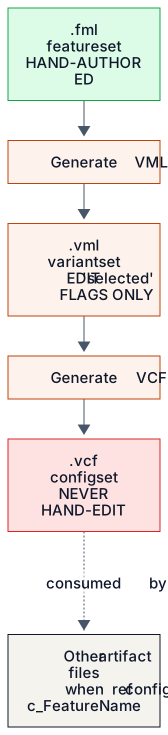
Each stage has its own editing convention. You hand-author the .fml and keep editing it as the feature model evolves. You generate the .vml, then hand-edit only its selected flags; for structural changes, you regenerate from the current .fml. You generate the .vcf and never touch it, and the consuming artifacts reference its def config identifiers through when ref config (Subchapter 6.5).
Simple idea, strict discipline
That's the variant-generation pipeline. The concept is simple: hand-author the .fml, edit selections in the .vml, generate the .vcf, and consume it everywhere else. The execution needs discipline, because breaking the editing conventions breaks the pipeline. Next, Subchapter 6.5 covers when ref config, the mechanism downstream artifacts use to gate their content on the resolved variant configuration.
Exercises
6.5 when ref config: variant gating across the project
The PLE pipeline from Subchapters 6.1 to 6.4 earns its keep through what it enables: variant-aware behavior across the rest of your project. The when ref config clause is what delivers it. Any def in any file (except .ple, .fml, .vml and .vcf themselves) can carry it to gate its inclusion on the value of a config in the active .vcf. In this subchapter we'll cover the mechanism, its consistency rules and its idiomatic patterns.
The basic mechanism
Any def artifact can carry zero or more when ref config c_<FeatureName> clauses. Here's what they mean: the def is active in a variant if and only if every when ref config clause on it evaluates to 1 in that variant's .vcf. If any clause evaluates to 0, the def is inactive. It stays in the project for inspection, but it drops out of the variant's behavioral and analytical scope.
In the cobot anchor's function model, the ForceFeedbackController function is gated on the ForceTorqueSensor feature:
def function ForceFeedbackController
  name "Force-Feedback Controller"
  description "Closed-loop force control using end-of-arm FT sensor."
  when ref config c_ForceTorqueSensor
  enables ref feature ForceTorqueSensor
In a variant whose .vcf has c_ForceTorqueSensor = 1, the function is active. Coverage analysis includes it, architecture implements ref function relationships pointing at it are valid, and the test cases for its derived requirements are in scope. In a variant with c_ForceTorqueSensor = 0, the function is inactive. Coverage analysis leaves it out of completeness checks, references to it from other artifacts fall under the consistency rules below, and any test cases gated on it drop out too.
Cross-artifact consistency rules
Variant gating opens the door to inconsistent references across the artifact graph. An active artifact might reference an inactive one, an inactive artifact might reference an active one, or both might be inactive (which is harmless). The validator has a specific rule for each case, reported through SYLANG_CONFIG_INCONSISTENT_REFERENCE (warning severity) and SYLANG_CONFIG_INVALID_REFERENCE (error severity).
- Both active. No diagnostic; the reference is valid. (Most references in any variant fall into this case.)
- Both inactive. Silent skip. The reference is harmless because neither side is in scope. The validator logs it at debug level but shows you no diagnostic.
- Active source → inactive target. A warning diagnostic. The reference is structurally suspect: something that exists in this variant points at something that doesn't. Fix it by adding a matching when clause to the source, removing the reference, or changing the gating on the target.
- Inactive source → active target. An error diagnostic. This case should be impossible, since an inactive artifact shouldn't be checked for references at all. It points to a bug in the gating logic, usually a missing when clause on something that should be inactive.
Together, the rules keep one invariant: within any variant, the active artifact graph is internally consistent, because every active artifact's references resolve to active artifacts. That invariant is what makes per-variant coverage analysis well-defined.
Gating propagation idioms
Three idioms govern how when clauses propagate through the artifact graph. I'll illustrate each one with an anchor project.
Idiom 1: gate the def at the lowest level. A function realized by a feature should carry when ref config c_<Feature>. A requirement that implements that function doesn't need its own when clause if it exists only because the function does. In the cobot anchor, ForceFeedbackController gates on c_ForceTorqueSensor, so a requirement that implements ref function ForceFeedbackController is implicitly inactive whenever the function is (through the consistency rules above). Adding an explicit when clause to the requirement is redundant but harmless.
Idiom 2: gate the parent, not every child. A def block that exists only in some variants should carry when ref config on the hdef block. Every characteristic, interface relationship and safety mechanism inside the block inherits the gating automatically. In the EPB anchor, imagine a hypothetical refactor where the MotorCrosscheck function becomes its own block. Its .blk file would carry when ref config c_DualMotorCaliper on the hdef, and nothing inside would need its own gating clause.
Idiom 3: gate the file's hdef when the whole file is variant-specific. Some artifacts exist only in some variants, such as an entire .tst file or an entire .flr file for one variant's failure modes. Put the when clause on the file's hdef. The agent loader and coverage analyzer then treat the whole file as inactive in non-matching variants.
Multiple when clauses: AND semantics
A def can carry more than one when ref config clause, and they combine with AND: the def is active only if every when clause evaluates to 1. That lets you express gating conditions that depend on several feature selections at once.
// A function active only in dual-motor + auto-engage variants
def function HighSpeedDualMotorAutoEngage
  name "Auto-engage optimized for dual-motor at speed"
  when ref config c_DualMotorCaliper
  when ref config c_AutoEngage
  ...
OR isn't supported directly. If you need it, restructure: add a parent feature whose two children are the disjuncts, or write separate def artifacts, each gated on one of the alternatives. Leaving OR out was a deliberate design choice. It keeps the gating logic propositional and fast to evaluate, at the cost of the occasional restructure.
Wrapping up Chapter 6
You've now seen Sylang's complete Product Line Engineering surface. We covered the historical context (6.1), the .fml file in detail (6.2), the four variability flags and the sibling-consistency rule (6.3), and the variant-generation pipeline through .vml and .vcf (6.4). This subchapter added when ref config, the gating mechanism that connects the variant configuration to the rest of the project. You now have the PLE artifact set in hand, ready to apply to your own product lines.
Chapter 7 covers the function model, the .fun file type that the feature model's performs relationships point into. Its anchor is the aerospace autopilot envelope-protection project, with the cobot, EPB and infusion pump as mirror examples. Chapters 6 and 7 together cover the upstream artifacts the rest of the engineering spine depends on. Chapters 8 (architecture), 9 (requirements), 10 (tests) and 11 (integration) build downstream from there.
Exercises
Key takeaways
You’ve got this chapter if you remember:
- A 150% model holds every feature any variant could have, and each shipped variant is the 100% you select from it.
- Four variability flags (mandatory, optional, or, alternative) plus requires and excludes make up the whole feature-model vocabulary, and the sibling-consistency rule keeps them unambiguous.
- You hand-author the
.fml, edit only the selected flags in a generated.vml, and never hand-edit the generated.vcf. - Any def outside the PLE files can carry when ref config c_<FeatureName>; several clauses combine with AND, and OR needs restructuring.
- Within any variant, the validator keeps the active artifact graph consistent, which is what makes per-variant coverage well-defined.
Check yourself
Answer in your head first, then reveal.
1Which flag combinations may appear among the siblings of one parent feature?
mandatory and optional mixed freely, all or, or all alternative. Any other mix fails with SYLANG_INCONSISTENT_SIBLING_FLAGS.
2Why should you never hand-edit a
.vcffile?It is generated from the
.vml, and its generatedat timestamp and generatedfrom reference are tooling contracts that downstream consumers rely on. Inconsistent edits are reported as SYLANG_VCF_HAND_EDITED.3A def carries two when ref config clauses. When is it active?
Only when both configs evaluate to 1 in the variant's
.vcf, because multiple when clauses combine with AND semantics.4What happens when an active artifact references an inactive one, and how do you fix it?
The validator raises a warning (SYLANG_CONFIG_INCONSISTENT_REFERENCE). Add a matching when clause to the source, remove the reference, or change the gating on the target.